
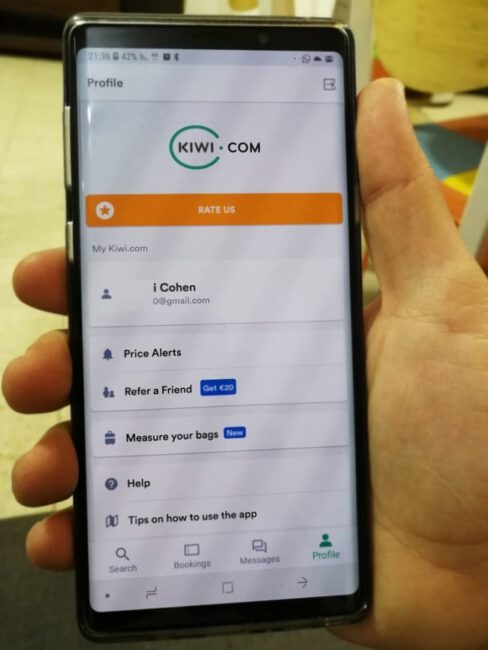
Have you ever heard of the website Kiwi (kiwi.com)? If not – it’s about time. You should know that this is currently one of the most powerful and advanced flight search engines in the world.
This search engine includes various features that improve the booking process, and getting to know it is going to change everything you knew about searching for flights online. For the better.
The site saves a lot of time thanks to various features that work in favor of the traveler rather than the airline, assisting us in our work on this site to find cheap flights.
There are quite a few websites you can use to find good travel deals, but as far as we are concerned, kiwi.com is the best of them all. We will explain why shortly. Get ready, this is going to be long but very detailed.
What does our guide include?
In this guide, we will tell you about our research process for finding cheap and fast flights, and about the booking process itself. We will check if the service is legitimate (hint – yes) and share our personal experience with you.
We will explain in detail how we found flights across Europe for 25 Euros – which allowed us to fly on pampering vacations at ridiculous prices, and much more.
The main advantages of Kiwi lie in searching within a date range and combining flights from different airlines. But we are getting ahead of ourselves…

The Flight Search Process
Every time we want to fly, we visit three websites:
Over the years, we’ve discovered that these sites are the best sources for finding good and cheap flights to anywhere in the world.
An in-depth check revealed that the Kiwi flights site is an OTA. That is, an Online Travel Agency. This means that this company primarily looks after its customers.
In contrast, Skyscanner and Google Flights are price comparison search engines that collect data from different providers and route customers to them. Here you can see the pros and cons of each (pros in green):
|
Google Flights |
Kiwi |
Skyscanner |
|
|
Search Method |
Review of local and international airlines |
Review of mainly international airlines |
Review of local and international airlines |
|
Calendar |
Shows a calendar with possible flight dates | Finds the cheapest flight within a date range |
Finds the cheapest flight within a date range |
|
Site Load Time |
Fast load time |
Average load time |
Fast load time |
|
App |
None |
Available |
Available |
|
Interface |
Reasonable |
Very user-friendly |
Very user-friendly |
| Connection Guarantee | No option to guarantee a seat | Guarantees a reserved seat |
No such option |
| Currency and Language Change |
Complex |
Possible |
Possible |
| Customer Service and Invoices | With each airline separately | In one system | With each airline separately
|
| Seat Reservation | Not possible | Possible |
Not possible |
Therefore, in any case, we initially use these sites to get a general idea about flights and prices. We try to answer at least the following questions:
- Is there a direct flight to the desired destination?
- Which airlines fly to this destination?
- What is the average price of the flight?
The best sites for this are Google Flights and Kiwi. However, one must know that the price is a result of supply and demand. For instance, flight prices are classically considered lower on weekdays and outside the tourist season.

This means that we use each of the sites for a different purpose:
Google Flights – To get the widest coverage in terms of airlines, so all you need to do is enter the destination and let the search engine do the work.
Skyscanner – To check flight prices for specific dates, allowing you to filter by price and set your flight dates accordingly.
Kiwi – To find cheap vacation destinations, meaning fitting the destination to the budget and not the other way around.
And of course – we use all three to compare flight prices. However, we usually make the final booking with Kiwi mainly because of the guarantees they offer (more on that later).
Features of the Website Kiwi.com
This is the time to get to know the site closely so you can save a lot of time and headaches.
Feature 1: Flight Search Within a Radius
This is one of our favorite features that, in our opinion, upgrades the search wonderfully.
What does it mean?
Instead of typing the destination name, you draw a circle on the map, and the search engine looks for flights within the radius you marked – so you can conveniently see all the different destinations and their prices.
Additionally, you can see prices for destinations outside the search radius – allowing you to find cheap flights to destinations relatively close to your target.
You can, of course, filter the search results, for example, search only for direct flights.
How to do it?
Outbound flight: Click on your location on the map, right-click, and then “Fly from here”.
Return flight: Click on the area you want to return from on the map, right-click, and then “Fly to here”.
When to use this feature?
When you are looking for a flight to a specific country or region but not a specific city. For example, you want to fly to Western Europe and don’t care where you land – as long as the flight is cheap.
For Example
Let’s say you want to fly to the Western European coast. Select a random point on the Western European coastline, right-click, and then select “Fly to here”. Immediately, a colored circle with 4 dots on its sides will appear on the map. Grab one of the dots and enlarge the circle to cover the area you want to reach.
Note, if you want to land in Portugal for example, write “Portugal” in the destination line. Kiwi will search for flights landing anywhere in Portugal. There is no need to use the radius feature described above here.
Feature 2: Fly Anywhere Easily
If you are looking to go on vacation and don’t know where – Kiwi is your solution.
Simply enter the departure date and set the destination to “Anywhere”. By the way, this is Kiwi’s default setting – which means you don’t even have to make an effort to type.
You can set a specific date or a date range and just see what comes up. This way you can get an idea of cheap destinations you probably hadn’t even thought of.
Feature 3: Multi-City Flights
Another feature that doesn’t exist in other search engines is the option to fly to several cities consecutively. Thanks to the fact that with Kiwi you can combine several flights from different airlines between different destinations in one itinerary, making the matter simple and easy.
Here too, you can choose specific dates or a date range and enjoy a search that flexes to you.
They even guarantee that you will make your connecting flight, and if not – you have a money-back guarantee.
You can also use this feature to compare different destinations. For example, when you are not sure where you want to fly and want the price to help you decide.
For example – are you unsure if it’s cheaper to fly to London after Prague or maybe it’s better to fly from Prague to Amsterdam? Compare flight prices, discover all the options available to you, and decide accordingly.
Feature 4: Combining Different Airlines
The previous feature requires booking flights via different airlines – which becomes a simple task on the Kiwi website.
The search engine looks for the cheapest flight combinations for you from a variety of airlines such as: El Al, Lufthansa, Turkish Airlines, and this is of course only a partial list.
However, Kiwi does not include every airline in the world. For example, small airlines in Southeast Asia are not yet included on the site. Scroll to the Kiwi Cons section below to learn more.
Feature 5: Date Range
One of the golden rules for finding cheap flights is simply to be flexible with dates. For example, flying on weekdays rather than weekends and, of course, skipping flights during holidays.
This is why the “Date Range” option on the Kiwi site is nothing short of genius. You can choose between the different options:
- Specific date (e.g., June 15th).
- Date range (e.g., the entire month of May).
- Anytime.
The first and third options need no explanation, so we will focus on the second option – a range of dates.
And it’s as simple as you think – if you want to fly abroad sometime in April but are stuck at work until the fifth of the month – you select the date range from April 6th to April 30th, and the site finds the cheapest flights to your destination, or to anywhere in the world if you selected the “Anywhere” destination.
Length of Stay
By the way, here you also have the option to choose the length of stay. For example, if you chose a date range from April 6th to April 30th and the length of stay is 2-10 nights, the search engine will find flights for three to eight days only within the date range you defined in April.
“Show me the cheapest destination”
Another click on this button (marked in blue in the following screenshot) will show you the cheapest destination that meets the criteria you defined (destination, date range and length of stay).
Feature 6: Price Alert
We think this feature is simply brilliant.
All you need to do is click the “Create Price Alert” button below the search fields after you have finished your search for a suitable flight. The site will alert you when it finds a cheaper flight and notify you via an email that looks like this:
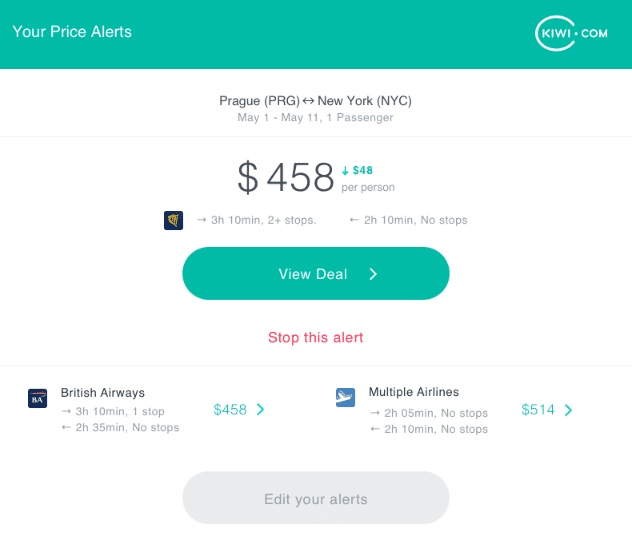
If you downloaded the app, you will get a push notification there too.
Feature 7: Dashboard for Flight Tickets and Boarding Passes
Unlike other systems such as Skyscanner, Kiwi provides an organized dashboard with all your bookings, their details, and PDF files of flight tickets and boarding passes centralized. This is very convenient when flying and returning with several different companies. Instead of switching between different airline interfaces, entering usernames and passwords over and over – here you have everything centralized. Saves precious time (especially in flights with short connections) and prevents frustration if you can’t find a specific flight ticket.
Feature 8: Automatic Check-in
If you’ve ever missed check-in and had to part with a few dozen Euros at the airport, you surely understand how important it is to check in on time. But before a flight, the pressure is high, and forgetting happens. Even if it hasn’t happened to you, if you fly a lot, it’s simply a matter of time. Kiwi thought of this too, and a few days before the flight, you will receive a notification or reminder email from Kiwi asking you to fill in check-in details. The app will do the rest for you automatically, and you will receive the boarding passes by email, and they will also be waiting for you in the booking dashboard.
Is booking via Kiwi safe?
You are probably asking yourself if the kiwi.com website is legitimate, reliable, and safe, right? Between us – there is no reason to pay more for flights just because the website looks cool, right?
Our answer requires a comparison to similar airline websites and other web portals.
Therefore, the comparison will be between the portals Skyscanner, Google Flights, and kiwi.com and will also include the official websites of the various airlines.
In terms of price, Kiwi wins big when comparing internet portals. And if you think official airline websites have bargains – you are mistaken.
Almost every internet search engine has agreements of some sort with airlines, so promotions and special offers that don’t exist on official sites are rare.
But what happens when flights are delayed or canceled?
This is where the kiwi.com Guarantee comes into the picture. In our opinion, this is one of the things that makes using this site worthwhile and turns Kiwi into a reliable search engine you can trust.
The kiwi.com Guarantee
The Kiwi search engine is completely safe when it comes to booking flights. They even commit that you will board the connecting flight if there is one. After all – this is how their algorithm works, and if something goes wrong, they are there to help you.
However, during our research, we found some really bad reviews about them and thought – maybe there is a justified reason? The truth is there is always a risk when booking a connecting flight not on the same airline – which means if the first flight is delayed, you will likely miss the connecting flight.
And worse – you will be forced to buy a new flight ticket with your hard-earned money.
Kiwi promises this won’t happen to you. Guaranteed.
But they will help you only if you help them. Meaning, you need to know their service in depth so they can accommodate you in the following cases:
- Flight delays
- Flight cancellations
- Schedule changes
If one of these scenarios materializes – Kiwi will arrange an alternative flight for you or refund your money. But again, you need to follow their rules and read the fine print.
Or as written on their website:
- The customer is obliged to inform the site of any of the above situations (delay, cancellation, schedule change).
- The customer is obliged to respond within 24 hours to alternative offers from Kiwi.
- The customer is obliged not to make any changes (e.g., booking a new flight) without Kiwi’s approval.
- If Kiwi agrees to a flight booking not within the internet framework – the customer is obliged to email them proof of payment for the flight within 14 days.
We think it is important to remember these simple rules, although between us – we know that in a situation of pressure, one forgets everything. Just stay calm and Kiwi will help you.
Check the company’s full guarantee here.

Cons of Kiwi.com
Although we have become avid fans of this search engine – it has some downsides we must share with you because the site is still not perfect (at least in our opinion).
We also think that pretending the site has no flaws is simply dishonest on our part.
Not all local airlines are included (although major ones are)
For example, small airlines in Southeast Asia are currently not included in the service. The truth is that there you can book flight tickets at the supermarket – which makes kiwi.com a bit redundant…
We are sure that additional airlines will be added to the site as soon as it is technically possible – which means it is a matter of time.
Just to be safe – we always check Google Flights as well to see if there are other local airlines, although that site does not include all of them either.
Customer service is a bit shaky
The internet is full of reviews about kiwi.com. Although most reviews are good, the bad reviews are simply lethal.
We did the work for you and read all the reviews about the company before writing this review – both the good and the bad.
Our recommendation – read everything you are committed to as customers, so the company won’t have an excuse not to provide you with the guarantee it committed to.
And of course – stay calm even when something goes wrong. It can never hurt…
Slow load time
True, the Google Flights site always loads faster than the Kiwi site.
Therefore, to use Kiwi properly you need to be patient and mainly – do not press any key while the site is loading.
We know the company is making efforts in this area (and there really are improvements all the time) but hey – it’s not really slow, just relatively slow compared to others. First world problems…
Our Flights and Experiences
You are probably asking yourself if we use the services of kiwi.com, right? So the answer is yes, and it was mainly to give you a first-hand impression.
We admit we didn’t book all our flights through this site, and our excuse is simple – we wanted to try other internet portals as well.
A flight from Prague to London via Kiwi cost 25 Euros and a flight from London to Barcelona – 15 Pounds. The last flight we booked through the company was from Southeast Asia to Europe.
Here the element of flight search within a radius came into play successfully.
We found a flight from Sri Lanka to Berlin for 220 Euros and not via a low-cost airline – which means we also enjoyed a good meal and the fact that we didn’t pay separately for baggage.
The only time we had a problem with Austrian (we paid in advance for an extra suitcase on Kiwi and Austrian didn’t recognize the transaction – and since it was a connecting flight and there wasn’t enough time to activate Kiwi’s customer service we had to pay 40 Euros for a suitcase at the airport), we contacted Kiwi through the site, sent a screenshot of the payment receipt, and received a refund of 40 Euros to the credit card after a few days (they commit to up to 30 days). It looked like this:
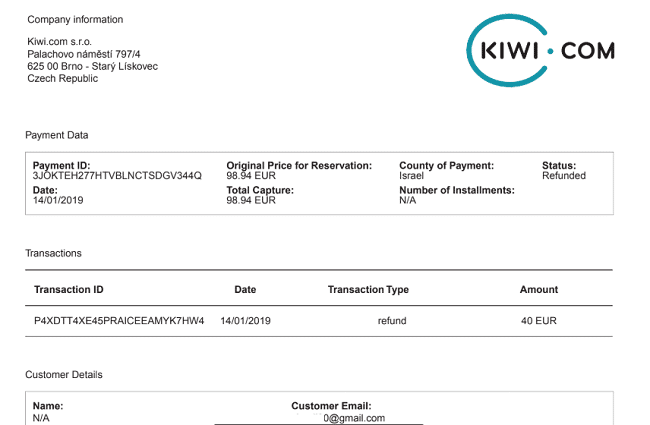
So far our impression of Kiwi is that it is a reliable, fair, fast company and has a big advantage in the form of the guarantee.
How to Start?
After using the site massively, we have some recommendations for you.
First recommendation – register for the service here. Why not? It can only help you and it’s free. All you need to do is enter your email address and that’s it.
Registration also gives you the option to receive an alert if the site finds cheap prices for you.
Second recommendation – download the app to your smartphone and sign up using your email account. There are different versions for Android and iPhone, so you are sorted in that regard.
If you created a price alert – you will receive a push notification on your phone.
Third recommendation – use “Filters”. Filters allow you to filter flights by travel styles, layovers, means of transport, bags, and more.
Fourth recommendation – know the Kiwi guarantee. True, we already talked about it, but we think it’s worth mentioning again. In case something goes wrong, this is the only solution that doesn’t require you to open your wallet, and it is also the major added value of the site and app. The guarantee protects you in the following cases:
Packing Carry-On Luggage
There are some gadgets that make the flight an easy and comfortable experience that you should pack in your carry-on luggage.
- Neck pillow
- Eye mask
- Earplugs
- Sweater (it’s always cold on planes)
- A good book
- iPad or portable movie player
- Your mobile phone
We always recommend checking the specific airline’s carry-on luggage policy in advance.
Guidelines in this area vary mainly with low-cost airlines – which means you need to read the instructions very carefully to avoid paying for extra luggage.
Sometimes carry-on luggage guidelines make the cheap flight price unattractive. Therefore, we repeatedly recommend checking between different internet portals and different airlines.
In short – don’t jump on every cheap flight on the internet. It is worth reading in depth before pulling out the credit card.
In Conclusion
The website kiwi.com is the ultimate portal for finding flights. We feel this is the first time someone is thinking seriously about customers and not just trying to sell them nonsense.
For us, using the site saves time, makes the search process fun, and allows discovering new destinations not previously considered.
Just bear in mind – websites naturally change often, it is possible that things on this page will be slightly different as time passes. If this happens, let us know so we can adjust the content more accurately to reality.
And just for clarification – we were not paid to write this review. We will receive a commission (small..) if you book your flights through this link or one of the links on this page, but you obviously don’t absorb that cost.
Don’t forget to share the article with friends and…
Have a pleasant flight!
P.S. There is a relatively new method for advanced users that will allow you to save even more money using a VPN. The combination of the new method and using the Kiwi search engine is lethal. Learn more about this option here.
Useful links

![[Advanced Guide] How to Find Discounted Flights by Masking Your Footprints with a VPN](https://yevanist.com/wp-content/uploads/2022/10/בלש-חושב-אחרי-מעקב-על-עקבות.jpg)