

Is Saily the Top Choice for International Data and Connectivity?
When preparing for an international getaway, figuring out how to stay online is often a top priority. We have tested numerous connectivity solutions, and one that stands out is an eSIM provider known as Saily, available in app stores simply as Saily.
This comprehensive guide offers a detailed breakdown of Saily’s eSIM capabilities, helping you decide if it is the right fit for your upcoming travels.
Our review stems from hands-on testing of the Saily eSIM across various destinations globally. While it is a robust solution, it may not suit every traveler’s needs. Let’s explore the details to give you a clearer picture.
Before we dive in, we have a special perk for our readers: Use any link in this article to purchase a Saily plan, and you will get a 5% discount at checkout — just remember to apply the coupon code: SPECIAL5
Understanding eSIM Technology
Most travelers are familiar with the traditional SIM card—that tiny plastic chip inside your phone that connects you to a cellular network. It stands for Subscriber Identification Module and serves as your unique ID for making calls, sending texts, and accessing mobile data.
These chips aren’t just for phones; they connect tablets, laptops, smartwatches, and even vehicles. Regardless of the device, their function remains the same: identifying you to the network so you can use the services you’ve paid for.
Historically, SIMs were physical objects containing circuitry encased in plastic. They have shrunk over the years—from standard to micro and then nano—but the concept involved physically inserting a card from a carrier into your device.
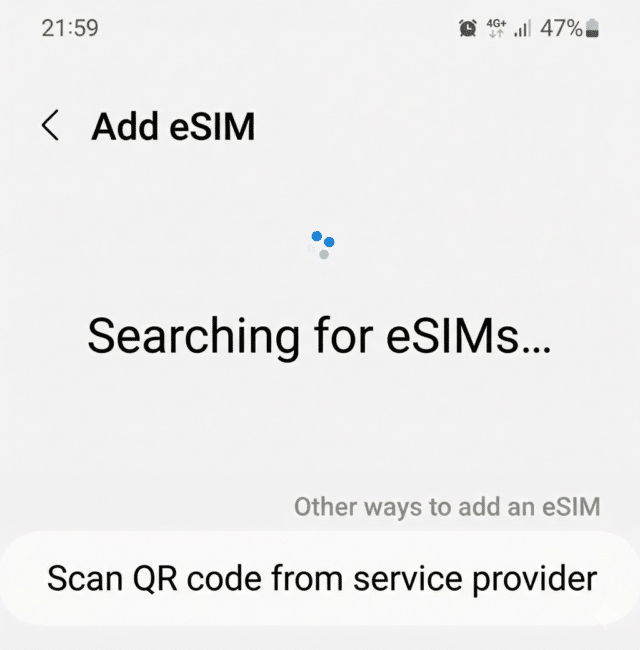
The “e” in eSIM stands for “embedded,” representing the next evolution of this technology. Instead of inserting a physical card into a slot, eSIM allows you to download and install a digital SIM profile, much like you would install a software application.
eSIM technology emerged around 2015, and by 2020, most premium smartphones included it. The shift accelerated when Apple released the iPhone 14 in the US in 2022 without a physical SIM tray. It is clear that eSIM is the future, and reliance on plastic cards will likely continue to fade.
The Benefits of Using an eSIM Abroad
Reliable internet access can significantly enhance your travel experience. From navigating unfamiliar streets and booking ferry tickets to finding restaurant reviews and managing reservations, our smartphones are essential travel tools. A stable connection frees you from the constant hunt for public WiFi.
Options for International Internet Access
- Activate an international roaming plan with your home carrier.
- Purchase a travel-specific physical SIM card before your trip.
- Download an eSIM profile for your specific destination or a regional bundle.
- Buy a local prepaid SIM card upon arrival.
- Rely on paid or free WiFi hotspots.
The best choice depends on variables like your specific phone model, your destination, and how much data you intend to consume.
Roaming Plans from Home Providers
If your domestic plan includes free roaming in your target country, that is fantastic. However, such plans are rare, making it worthwhile to explore alternative solutions.
Purchasing a Physical Travel SIM
You can order a travel SIM in advance or buy a local one when you land. Buying a local SIM card is often the most cost-effective method, provided your phone is unlocked.
That said, finding the right shop and negotiating a plan in a foreign language can be stressful immediately after a long flight, making this option less convenient for some.
Choosing an eSIM for Specific Countries or Regions
eSIMs are tailored for modern travelers who move between borders and want seamless connectivity without swapping physical chips. It caters to those seeking an easy, affordable way to stay online anywhere.
Many providers now offer competitive travel eSIM services, and Saily has emerged as a leading option in this space.
Claim a 5% discount at Saily by using the code SPECIAL5 during registration.
Saily provides connectivity services in over 200 countries, ensuring you can access the web practically anywhere you travel.
Saily’s Plan Options
Saily generally categorizes its eSIM offerings into three types:
- Single Country Plans: These cover one specific nation and are usually the cheapest choice if you aren’t hopping borders.
- Regional Plans: These cover broader areas like Europe, Asia, or Latin America. They are perfect for backpackers or multi-stop vacations.
- Global Plans: These provide access in over 85 countries. If you are embarking on a world tour, view the coverage list here.
Once you select the type of coverage, you will need to choose the duration (validity) and the data allowance.
For work-heavy trips, we typically consume 5-7 GB per week. However, for standard vacations, 1-2 GB per week is usually sufficient for maps and messaging.
If you anticipate heavy usages—like video calls, uploading media, or using a mobile hotspot—opt for a larger data cap. Casual users checking email and social media can save money with smaller packages.
Data-Only Plans
It is crucial to remember that most eSIMs are data-only. They generally do not include a phone number for traditional calls or SMS. However, since apps like WhatsApp and Telegram are widely used, this is rarely an issue. If you require standard voice calls, an eSIM might not be the complete solution for you.
Saily Pricing Structure
Saily’s pricing fluctuates based on the destination’s local data costs, as well as the length and size of the plan you select.
Generally, buying larger data packs for longer durations offers better value per GB. However, the goal is to save money, so only buy what you need. The advantage of digital plans is that you can instantly top up if you run low.
For reference, here are some sample prices as of March 2025:
- $17.09 for 10GB (30 days) in Norway.
- $12.34 for 5GB (30 days) in Albania.
- $9.49 for 5GB (30 days) in Cyprus.
- $55.09 for 5GB (30 days) covering Latin America, including Costa Rica.
- $91.19 for 50GB (90 days) covering 39 European nations, including Monaco, The Azores, Greece, and Germany.
Get a 5% discount at Saily by using code SPECIAL5 when signing up.
Getting Started with Saily
The setup process is straightforward:
- First, ensure your phone supports eSIM. Most devices made after 2020 are compatible. You can verify your device on this list.
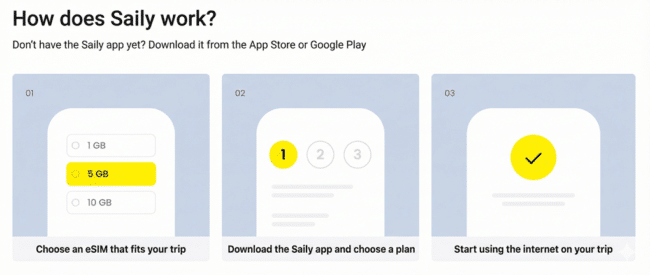
- Download the Saily app for Android or Apple iOS.
- Create an account in the app. Remember to input the code SPECIAL5 to unlock your 5% discount.
- Select your desired Country, Regional, or Global plan, complete the payment, and you are ready to connect.
Why Choose Saily Over Competitors?
- Affordability – Saily is often cheaper than traditional roaming and many other travel SIMs. You can also use your phone as a hotspot to share data, though remember that laptops consume data quickly.
- Simplicity – Setting up Saily is hassle-free. You can install the eSIM before you leave and activate it the moment you land. This avoids the need to research local carriers or navigate foreign settings menus.
- Transparent Costs – Unlike some local SIMs that require confusing SMS codes or top-ups in local languages just to work, Saily is straightforward.
- Privacy – Many countries mandate passport scans or ID checks for SIM cards. Saily typically only requires your app login or biometrics.
- eSIM-Only Ready – Essential for modern phones that lack physical SIM slots, where local plastic cards aren’t an option.
- Reliability – In our tests, connection is usually established within seconds of activation. The app also lets you track usage and alerts you when data is low.
- Dual Connectivity – You can keep your physical home SIM active for receiving verification SMS (like bank codes) while using the eSIM for data.
Potential Drawbacks
- Device Compatibility – The biggest hurdle with Saily is hardware support. You must have a newer phone that supports eSIM. Older smartphones simply cannot use this service.
- Cost vs. Local – While convenient, Saily might be slightly pricier than a local SIM bought on the street. However, the convenience and language support often justify the small difference.
- No Native Calls/Texts – Saily is a data-focused service. While VoIP apps work great, if you need traditional cellular calls or SMS, a local SIM is a better fit.
- Device Lock – Generally, an eSIM profile cannot be transferred to a different device once installed.
Get a 5% discount at Saily by using code SPECIAL5 when signing up.
Solving Connectivity Issues
If you arrive and cannot connect, try these steps before contacting support:
- Ensure Airplane Mode is turned OFF.
- Verify that Mobile Data and Roaming are both switched ON.
- Check your settings to ensure the eSIM is selected as the active source for data (phones often allow one SIM for calls and another for data).
- Restart your phone.
- Double-check that APN settings match the instructions provided in the installation guide.
- If issues persist, contact Saily customer support.
Get a 5% discount at Saily by using code SPECIAL5 when signing up.
Useful links
![[Advanced Guide] How to Find Discounted Flights by Masking Your Footprints with a VPN](https://yevanist.com/wp-content/uploads/2022/10/בלש-חושב-אחרי-מעקב-על-עקבות.jpg)